Free Chrome extension
Calories and macros on every recipe page
Open a recipe and see calories, protein, carbs and fat per serving right on the page. Works on Allrecipes, BBC Good Food and 40+ recipe sites.
Free · No account · Nothing leaves your browser
What you see on a recipe
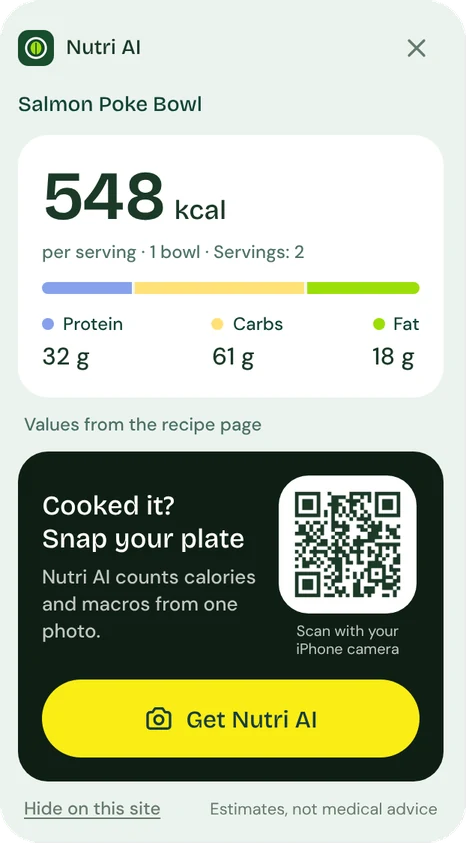
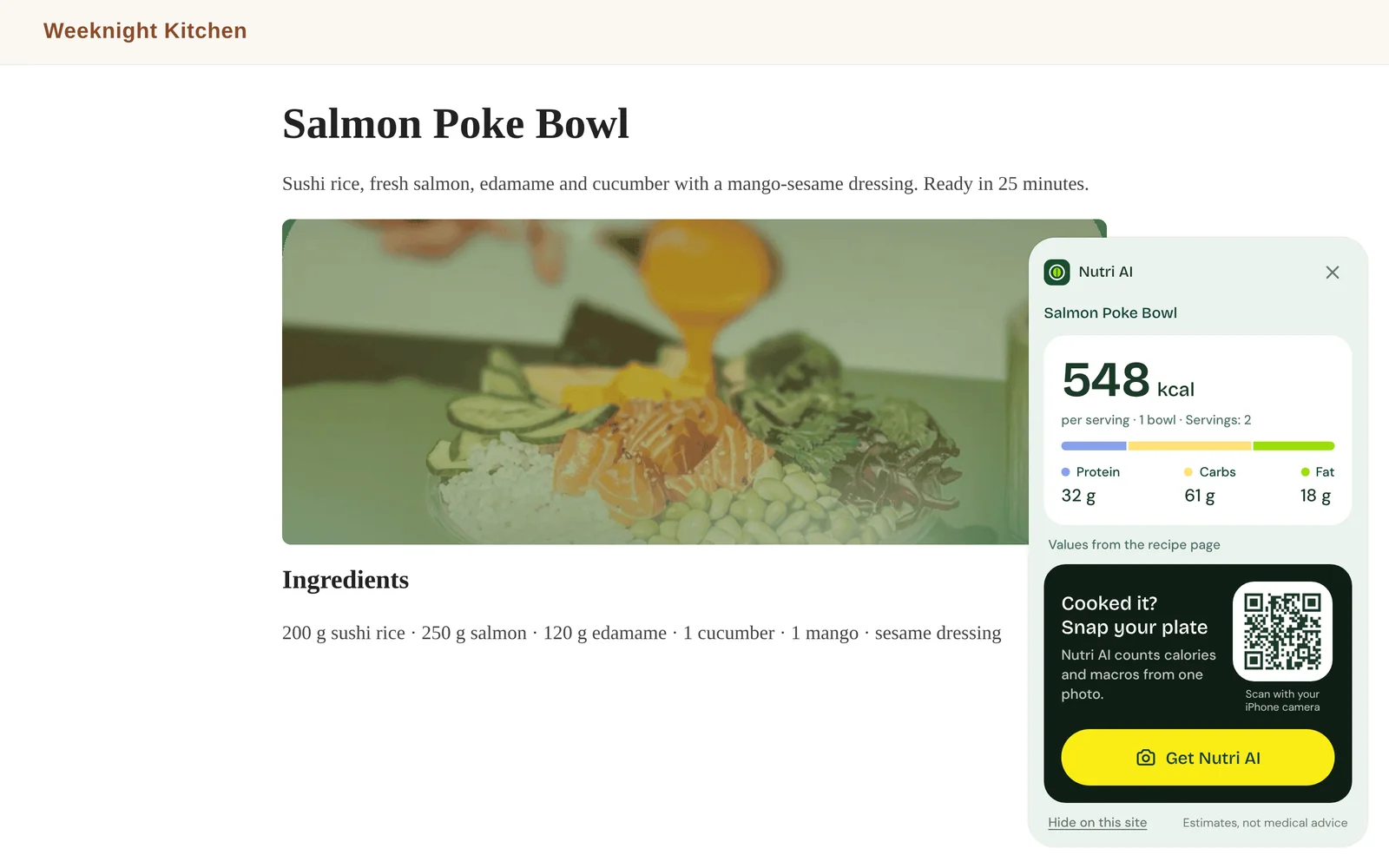
Calories per serving
A big, clear number with the serving size and the number of servings the recipe makes.
Protein, carbs and fat
Grams of each macro and a colour bar that shows the balance at a glance, in the same colours as the NutriAI app.
Calories on the toolbar
The extension icon shows the kcal number as soon as the recipe loads, before you even scroll.
Honest when data is missing
If a recipe lists macros but no calories, the extension calculates them and says so. If it lists no nutrition at all, it tells you instead of guessing.
How it works
- 1
Add the extension to Chrome
- 2
Open a recipe on a supported site
- 3
See calories and macros on the page
Works on 40+ recipe sites
The card appears automatically on popular English and German recipe sites, including:
- Allrecipes
- BBC Good Food
- Food Network
- Serious Eats
- Simply Recipes
- Epicurious
- Bon Appétit
- NYT Cooking
- Tasty
- EatingWell
- Budget Bytes
- RecipeTin Eats
- Pinch of Yum
- Skinnytaste
- Jamie Oliver
- HelloFresh
- Chefkoch
- Lecker
- Kitchen Stories
- EAT SMARTER
- and more
Cooking from a food blog? Turn on “Show on every recipe site” in the extension menu. Chrome will ask for your permission first, and you can turn it off at any time.
Private by design
- Reads only the recipe’s nutrition data on the page you open
- Works entirely in your browser: nothing is sent to us or anyone else
- No account, no tracking, no ads
- Your settings stay on your device
FAQ
- Is the extension free?
- Yes. The Recipe Calorie Counter is free and doesn’t need an account.
- Where do the numbers come from?
- From the recipe page itself. Most recipe sites publish nutrition facts in a standard format for search engines; the extension reads it and shows it clearly. If calories are missing, it calculates them from protein, carbs and fat.
- Why don’t I see calories on some recipes?
- Some sites don’t publish nutrition data. In that case the extension tells you the recipe lists no nutrition, so you can estimate your plate with the NutriAI app after cooking.
- Does it collect my data or browsing history?
- No. Everything runs locally in your browser. The extension stores only your settings, such as sites where you hid the card, on your device.
- Which languages does it support?
- The extension’s interface is available in English and German. It works on recipe sites in any language that publish nutrition data.
- Can I hide it on a site?
- Yes. Choose “Hide on this site” on the card, and show it again any time from the extension menu.
Cooked it? Snap your plate
The NutriAI app estimates calories and macros from one photo of your meal, even for recipes without nutrition facts.
2 free scans, then a 3-day free trial. Cancel anytime.